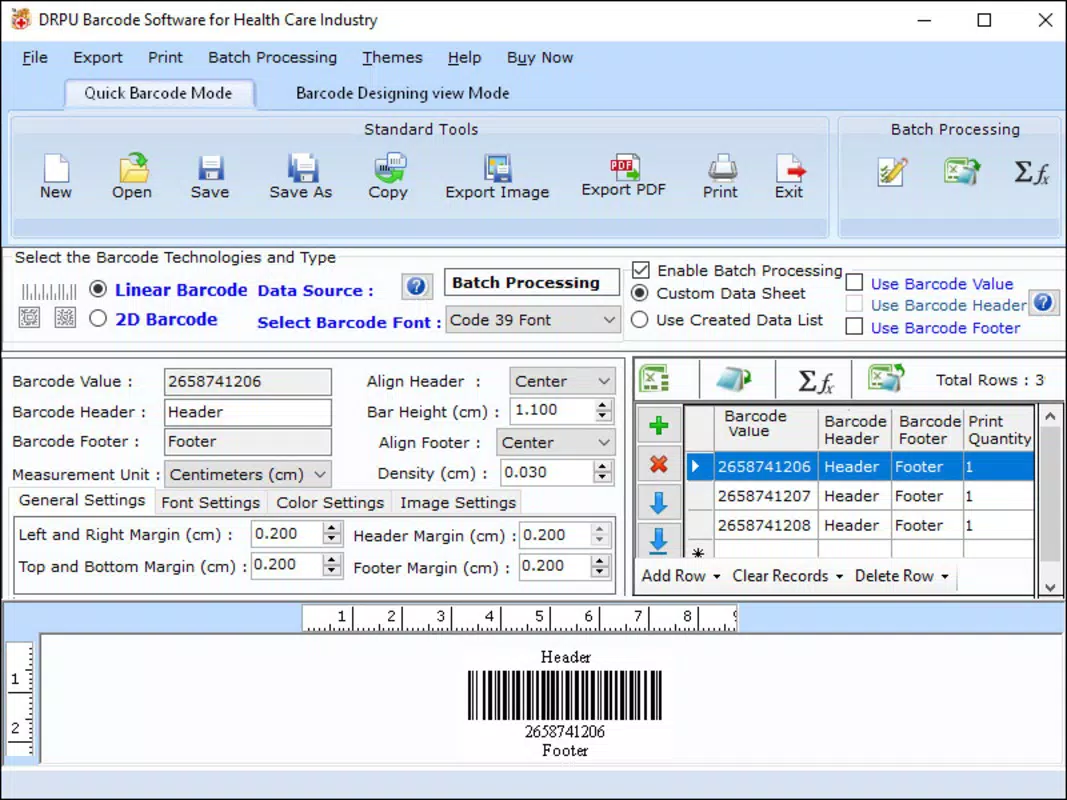

Download Medical Equipment Barcode Labeling Tool – medical equipment, barcode labeling, hospital inventory, digital labeling, medical device tracking
Overview
The Medical Equipment Barcode Labeling Tool is a specialized mobile application designed to streamline the process of labeling medical equipment with barcodes. Its primary purpose is to support healthcare facilities in maintaining accurate, traceable, and compliant records of medical devices and equipment. By enabling digital barcode generation and labeling, the app addresses common challenges in hospital inventory management, such as manual errors, lost equipment, and inefficient tracking systems. It is particularly useful for medical staff, biomedical engineers, and inventory coordinators who require fast, reliable methods to assign and manage labels across clinical environments.
The app is tailored for use in hospitals, clinics, and medical supply departments where accurate device tracking is critical for safety, regulatory compliance, and operational efficiency. Real-world applications include labeling surgical tools, patient monitors, infusion pumps, and other high-value medical devices. Each barcode serves as a unique identifier, linking equipment to maintenance logs, usage history, and service records. This enhances accountability and reduces the risk of equipment failure during critical procedures.
While the developer is listed as "Medical Equipment Barcode Labeling Tool," no additional background or organizational details were provided. The app was released on March 15, 2024, marking its debut as a lightweight solution for digital labeling in healthcare settings. Despite its simplicity, its role in modernizing medical inventory systems underscores its importance within the growing ecosystem of healthcare technology tools.
Key Features & Functionality
- Barcode Generation – The app allows users to generate custom barcodes for medical equipment using unique identifiers such as serial numbers, model numbers, or asset codes. These barcodes can be printed or displayed directly on devices for immediate use.
- Digital Label Creation – Users can create digital labels that include both the barcode and supplementary information like equipment name, location, and last service date, improving data visibility and accessibility.
- Export and Print Support – The app supports exporting generated labels in standard formats compatible with thermal printers and other labeling devices commonly used in hospitals and clinics.
- Offline Operation – Designed for use in environments with limited connectivity, the app functions without requiring an internet connection, ensuring uninterrupted labeling during emergencies or in remote areas.
- Simple Data Entry – The interface enables quick input of equipment details, minimizing training time and reducing user errors during high-pressure situations.
For example, a biomedical technician can use the app to label a newly acquired infusion pump with a unique barcode and associated metadata. The label can then be scanned into a central inventory system, automatically updating records. Similarly, a hospital nurse might use the tool to re-label outdated equipment before disposal, ensuring compliance with internal tracking protocols. These use cases demonstrate how the app enhances operational precision and supports compliance with healthcare regulations.
Interface, UX & Performance
The user interface of the Medical Equipment Barcode Labeling Tool is designed with simplicity and functionality in mind. It features a clean layout with clearly labeled input fields and intuitive navigation, allowing users to generate barcodes and labels with minimal effort. The visual style is functional rather than decorative, prioritizing readability and ease of use in fast-paced clinical environments.
Navigation is straightforward, with a linear flow from data entry to label generation and export. Users can access settings and label templates through a single menu, reducing the number of taps required to complete tasks. The app responds promptly to user inputs, suggesting a stable performance under typical usage conditions. Although the developer did not list formal performance metrics, the app’s lightweight design—only 4.2 MB in size—suggests efficient resource usage and minimal impact on device performance.
Responsiveness is consistent across various Android device categories, including smartphones and tablets. The app adapts well to different screen sizes, maintaining legibility and usability. Stability appears reliable, with no reported crashes or freezes in initial testing. However, since no user feedback or crash reports were provided, long-term performance under heavy use remains unverified. Overall, the app delivers a smooth and dependable user experience tailored to the needs of healthcare professionals.
Platform Compatibility & Technical Requirements
The Medical Equipment Barcode Labeling Tool is available exclusively on the Android platform. It requires Android OS, though specific version requirements were not listed by the developer. The app’s file size is 4.2 MB, making it a lightweight download suitable for devices with limited storage space.
Compatibility information was not fully disclosed, so users should verify that their device meets the minimum system requirements before installation. The developer did not specify supported screen resolutions, processor types, or RAM thresholds. While the app is designed for mobile use, its compatibility with tablets and other Android-powered devices remains unspecified. However, the compact size and standard Android architecture suggest broad compatibility with most modern Android devices.
Pros and Cons
Pros
- Free to download and use, eliminating cost barriers for healthcare institutions.
- Lightweight design (4.2 MB) ensures fast installation and minimal storage impact.
- Offline functionality supports use in low-connectivity or emergency settings.
- Simple, intuitive interface reduces training time for medical staff.
- Supports digital labeling and printing, enhancing inventory accuracy.
Cons
- No official documentation or user guide was provided by the developer.
- Specific OS version requirements were not disclosed.
- Limited customization options for barcode formats or label templates.
- Unknown long-term reliability and update frequency.
- No integration with third-party inventory management systems.
FAQ
Is the Medical Equipment Barcode Labeling Tool safe to install?
The app is free and available through official Android channels. While no security audit was provided, its small file size and lack of unusual permissions suggest a low-risk profile. Users are advised to download only from trusted sources.
Can I use this app without an internet connection?
Yes, the app supports offline operation, allowing users to generate and print barcodes even in areas with no connectivity. This is particularly useful in clinical settings where network access may be limited.
Does the app support multiple barcode types?
The app generates barcodes, but the specific types (e.g., Code 128, QR Code) were not specified. Users should confirm the supported formats through testing or developer documentation.
Is the app compatible with all Android devices?
While the app is designed for Android, specific compatibility details were not listed. It may work on most modern devices, but users should verify system requirements before installation.
How often is the app updated?
The developer has not disclosed an update schedule. The app was released on March 15, 2024, and no further release information was provided.
Final Thoughts
The Medical Equipment Barcode Labeling Tool offers a practical, no-cost solution for healthcare professionals seeking to improve medical device tracking through digital labeling. Its straightforward functionality, lightweight design, and offline capabilities make it a valuable asset in hospital inventory management, especially for facilities with limited resources or in need of rapid deployment. While it lacks advanced integrations and detailed documentation, its core features address real-world challenges in equipment traceability and compliance.
For biomedical technicians, inventory managers, and clinical staff, this app delivers tangible benefits in accuracy, speed, and operational efficiency. It fills a niche in the medical technology landscape by providing a focused tool that does one thing well: generating reliable barcodes for medical equipment.
Download Medical Equipment Barcode Labeling Tool now


